New Contributor
December 27, 2022
Solved

Default log on screen

  • December 27, 2022
  • 0 replies
  • 151 views

How am I able to set the default log on screen to the opportunities tab?  Currently it defaults to a Dashboard.


Also, using Chrome, is there a way to pin the Clari page in the Bowser so Clari is always a tab that is available? 


Thanks,


Pat Kenny

This topic has been closed for replies.
Best answer by JessicaStarr

Hi @Patrick Kenny  - apologies for the delayed holiday response! I can change a setting in your account to default to Opportunities instead of Dashboards - please let me know if you’d like me to go ahead and apply that setting.


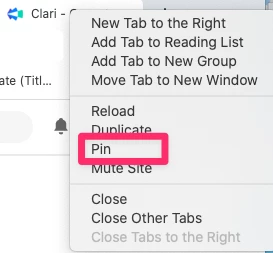
As for pinning Clari to a page in the browser, I believe if you right click the tab and select pin, that might do the trick.


Happy new year!

Jessica 

JessicaStarr
Salesloft Employee
Salesloft Employee
January 1, 2023

Hi @Patrick Kenny  - apologies for the delayed holiday response! I can change a setting in your account to default to Opportunities instead of Dashboards - please let me know if you’d like me to go ahead and apply that setting.


As for pinning Clari to a page in the browser, I believe if you right click the tab and select pin, that might do the trick.


Happy new year!

Jessica 

New Contributor
January 5, 2023

Hi Jessica,


Yes, please change the default to opportunities. 


Unfortunately the Pin tip only Pin’s the page during that browser session. If you quit and restart Chrome it goes away.


thanks


Pat