I would love the ability to customize individual field history tracking by selecting different historical ranges. For example, being able to compare data over 1 day, 3 days, or 7 days would be beneficial when applying multiple quotes that adjust frequently.
Hi, @ncunningham! I want to make sure I understand what you’re asking here, are you in Opportunities and wanting to be able to set a filter for deals where specific field(s) were updated within specific date ranges? Or would you like a concept in Clari of being able to see the specific changes that were made to those fields during a selected time period?
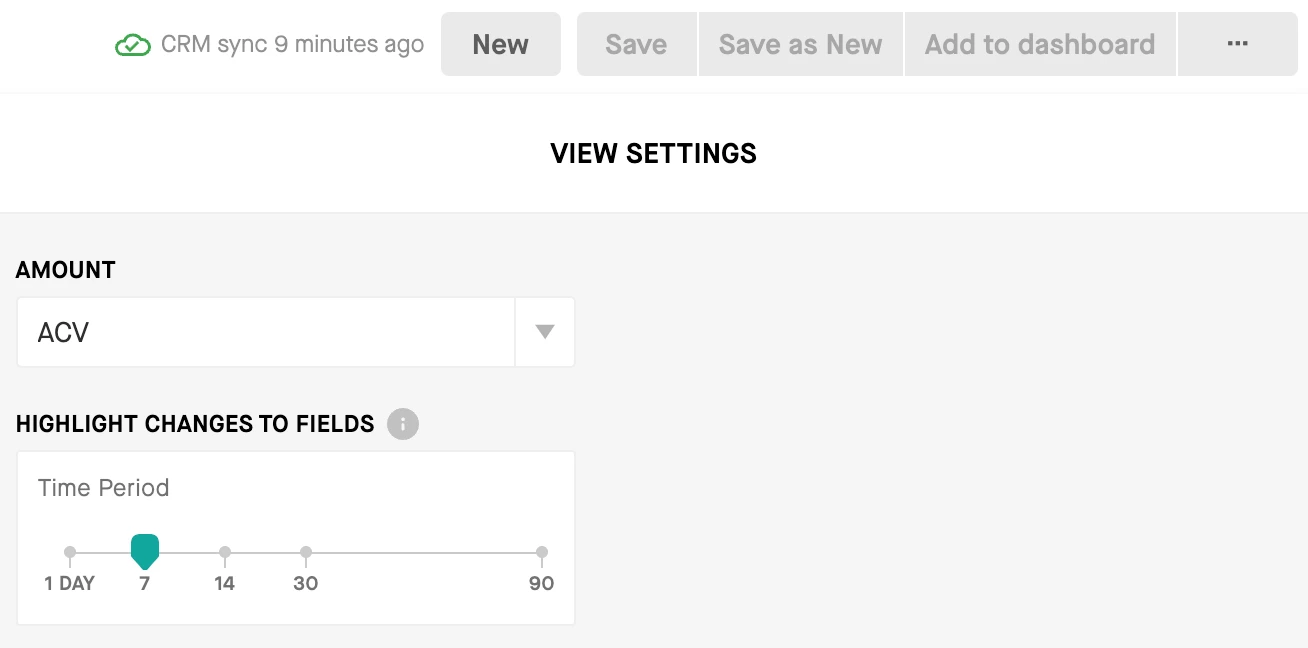
I think the closest thing we might have to what you’re looking for in Clari today may be the highlighted field changes. You can adjust the time range that Clari takes into consideration to highlight fields that were changed in your Saved View settings in the Opportunities Module:
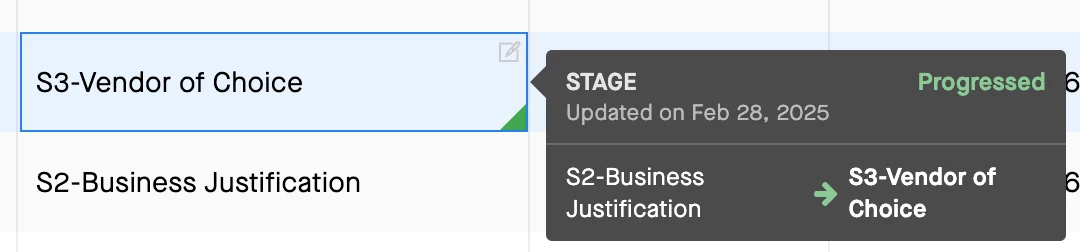
Once that is set, the fields that have been updated within the time frame you selected will be highlight in green, red, or blue depending on if the change represents progression through the sales cycle (green), regression through the sales cycle (red), or a neutral.non-linear update (blue). You can hover over any of these fields today to see what the last change was.
Just highlighting this functionality in case it gives you what you’re looking for (either all or in part). If I’m off base or you have any follow-up questions, please don’t hesitate to clarify!
Hi, @ncunningham! I want to make sure I understand what you’re asking here, are you in Opportunities and wanting to be able to set a filter for deals where specific field(s) were updated within specific date ranges? Or would you like a concept in Clari of being able to see the specific changes that were made to those fields during a selected time period?
I think the closest thing we might have to what you’re looking for in Clari today may be the highlighted field changes. You can adjust the time range that Clari takes into consideration to highlight fields that were changed in your Saved View settings in the Opportunities Module:
Once that is set, the fields that have been updated within the time frame you selected will be highlight in green, red, or blue depending on if the change represents progression through the sales cycle (green), regression through the sales cycle (red), or a neutral.non-linear update (blue). You can hover over any of these fields today to see what the last change was.
Just highlighting this functionality in case it gives you what you’re looking for (either all or in part). If I’m off base or you have any follow-up questions, please don’t hesitate to clarify!