New Contributor
February 21, 2024
Solved

Contact Roles?

  • February 21, 2024
  • 0 replies
  • 215 views

Is there anyway to bring Contact Roles into our reporting in Clari?

This topic has been closed for replies.
Best answer by Kenna

Thanks, Oscar!

I also wonder if we might be able to get you what you are looking for in Expanded View, Ryland.

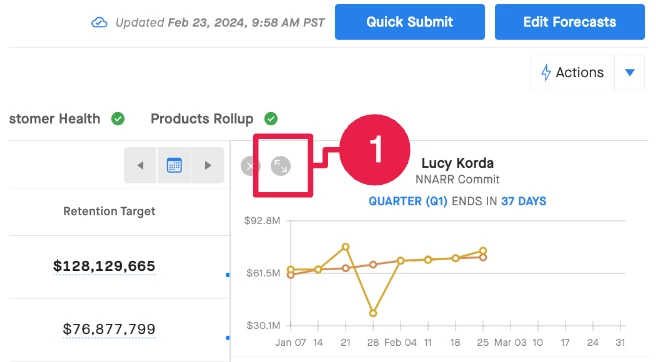
If you expand the Expanded View panel (as seen below):


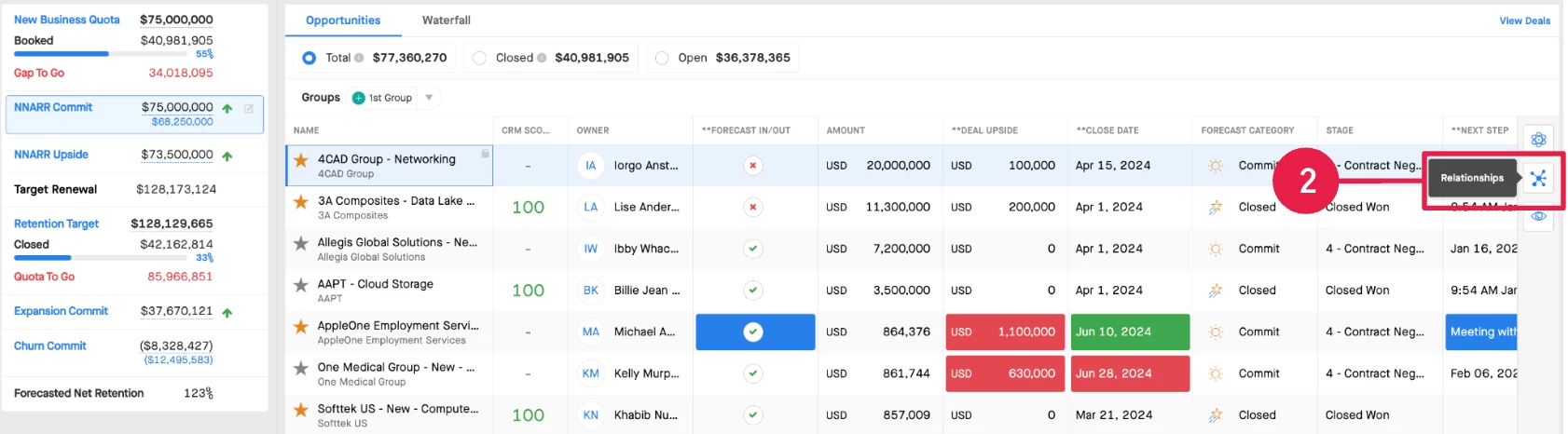
Once expanded, do you see the icon to expand the Relationships on the right side? Forgive me, I cannot presently remember if this is something all users should see or if you need to have Clari’s Capture solution to see it.


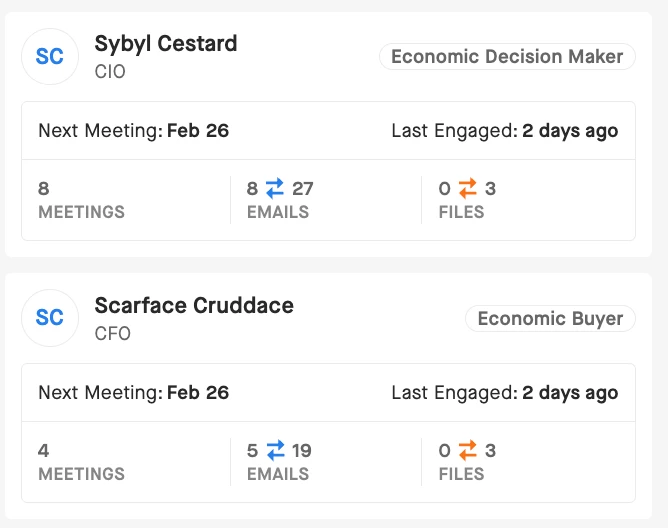
I think this may show you the details you’re looking for about the contacts that you have involved in the deal if you have it:


Kenna
Community Manager
Community Manager
February 22, 2024

Hi, @Ryland King. Clari’s Capture logs activities to opportunities (or accounts), and creates missing contacts and/or contact roles. If that’s what you’re looking for more information on, you can find it in our Knowledge Base! Or is there a different module other than Capture that you want to see this contact information in?

Kenna Valdez, Manager, Customer Community, Clari
New Contributor
February 23, 2024

Thanks! I guess ultimately I want to my team to be able to view contact roles related to a deal on the Forecast page. Is that possible?

Oscar Armas-luy
New Contributor
February 23, 2024

Thanks! I guess ultimately I want to my team to be able to view contact roles related to a deal on the Forecast page. Is that possible?

As Kenna mentioned, I think it is straightforward with Clari Capture. 

Since it sounds like you don’t have it enabled, the workaround that comes to mind is to create a field or set of fields in SFDC that populate based on contact roles and then pull that into the opp grid. 

Would that work? Sorry if I misunderstood what you’re after. 

Kenna
Community Manager
KennaAnswer
Community Manager
February 23, 2024

Thanks, Oscar!

I also wonder if we might be able to get you what you are looking for in Expanded View, Ryland.

If you expand the Expanded View panel (as seen below):


Once expanded, do you see the icon to expand the Relationships on the right side? Forgive me, I cannot presently remember if this is something all users should see or if you need to have Clari’s Capture solution to see it.


I think this may show you the details you’re looking for about the contacts that you have involved in the deal if you have it:


Kenna Valdez, Manager, Customer Community, Clari