New Member
April 22, 2024
Solved

Clari box color

Something changed in my view where the entire box used to be the full color and now it’s just a triangle in the bottom right.  How do i switch it back so that the whole box is colored.
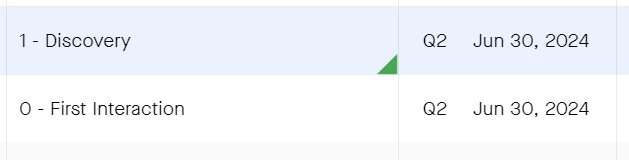


    This topic has been closed for replies.
    Scott K Wilder
    Expert Contributor
    April 23, 2024

    @David Gardiner

    Normally, this is how you fix it. 

    Go to

    • Top right initials icon
    • Preferences 
    • Check full cell highlighting

    I say ‘normally’ because there is a known bug about this -- the team is working on fixing.

    Scott K. Wilder, Head of Digital Success and Self-Serve, Clari
    Scott K Wilder
    Expert Contributor
    April 23, 2024

    @David Gardiner

    Normally, this is how you fix it. 

    Go to

    • Top right initials icon
    • Preferences 
    • Check full cell highlighting

    I say ‘normally’ because there is a known bug about this -- the team is working on fixing.

    Scott K. Wilder, Head of Digital Success and Self-Serve, Clari
    New Contributor
    May 28, 2024

    Same for me. CSM says this is the new design. Argh...