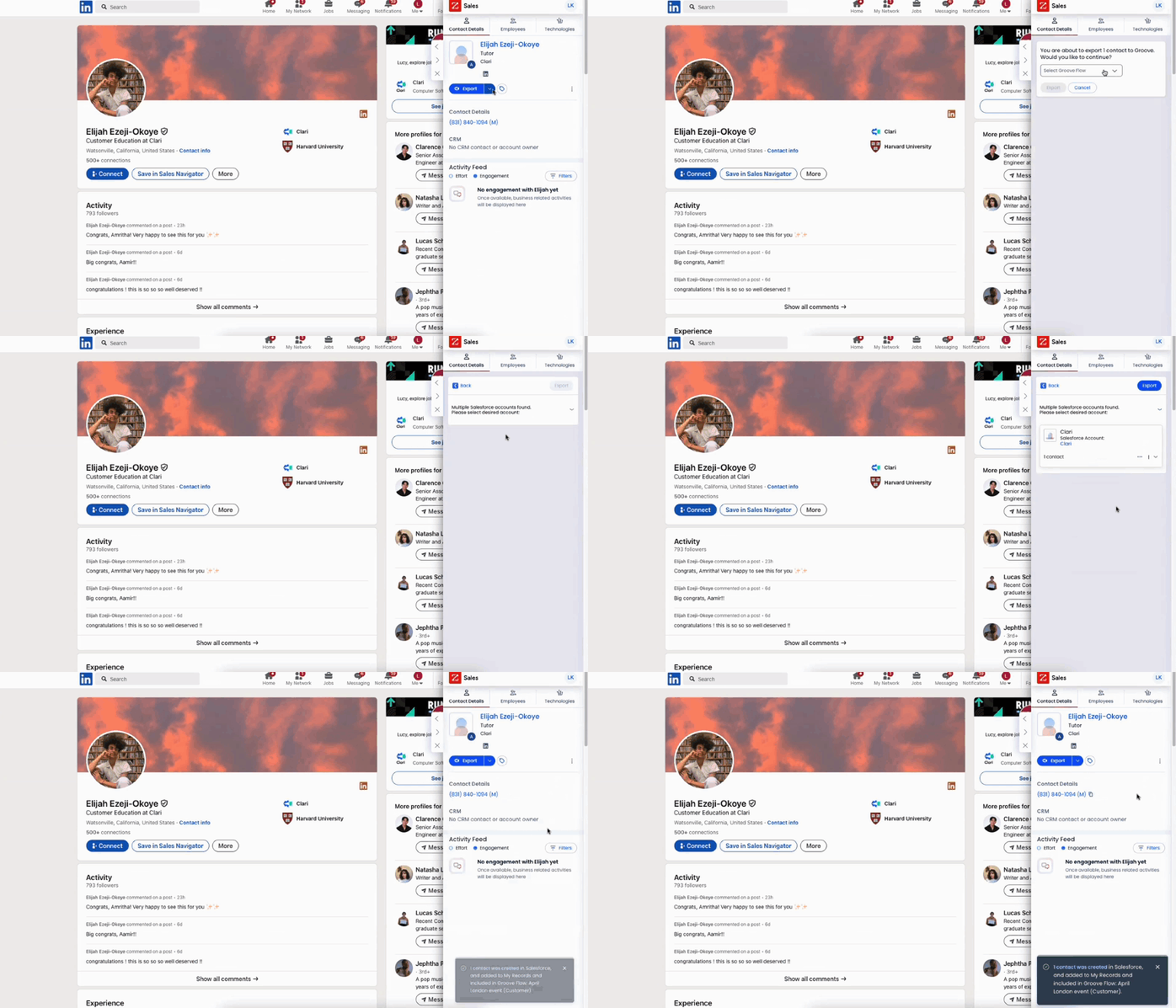
Hi, Izzy! Thanks for your patience on this one as I consulted my Groove experts. The best way to import people into a Flow from within LinkedIn or LinkedIn Sales Navigator is via the ZoomInfo <> Clari Groove integration. This method requires that you have a ZoomInfo license and that your admin team has enabled the ZoomInfo <> Clari Groove integration for your org through these steps. The steps below are with the example of a single person, but you can also use this method to export people into Groove Flows in bulk from a ZoomInfo list. Simply select as many people as you want from the list!
To import people from LinkedIn into a Groove Flow:
Open up the ZoomInfo extension on LinkedIn such that the person you're viewing is displayed in the ZoomInfo sidebar.
Click the blue "Export" button
Select Groove, then choose whether you'd like to export this person to Salesforce as a Lead or a Contact
If you select a Contact, you'll also need to indicate which Salesforce Account record you'd like to attach this Contact to
Search and select which Groove Flow you'd like to export this person to from the Flows that you own or are shared on
Once the process completes, you'll see a success message or a failure message indicating whether the export was successful
Common reasons why exports may fail include Flow Import Block Rules being applied and the Flow Safety setting
Hi, Izzy! Thanks for your patience on this one as I consulted my Groove experts. The best way to import people into a Flow from within LinkedIn or LinkedIn Sales Navigator is via the ZoomInfo <> Clari Groove integration. This method requires that you have a ZoomInfo license and that your admin team has enabled the ZoomInfo <> Clari Groove integration for your org through these steps. The steps below are with the example of a single person, but you can also use this method to export people into Groove Flows in bulk from a ZoomInfo list. Simply select as many people as you want from the list!
To import people from LinkedIn into a Groove Flow:
Open up the ZoomInfo extension on LinkedIn such that the person you're viewing is displayed in the ZoomInfo sidebar.
Click the blue "Export" button
Select Groove, then choose whether you'd like to export this person to Salesforce as a Lead or a Contact
If you select a Contact, you'll also need to indicate which Salesforce Account record you'd like to attach this Contact to
Search and select which Groove Flow you'd like to export this person to from the Flows that you own or are shared on
Once the process completes, you'll see a success message or a failure message indicating whether the export was successful
Common reasons why exports may fail include Flow Import Block Rules being applied and the Flow Safety setting